
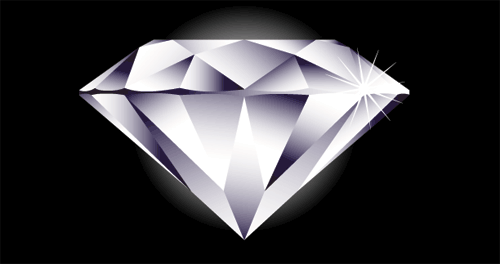
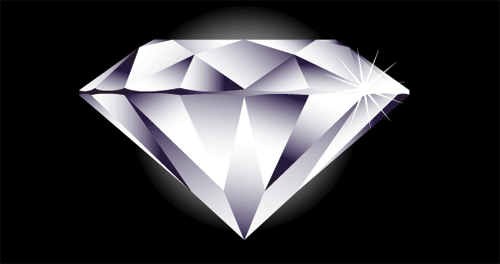
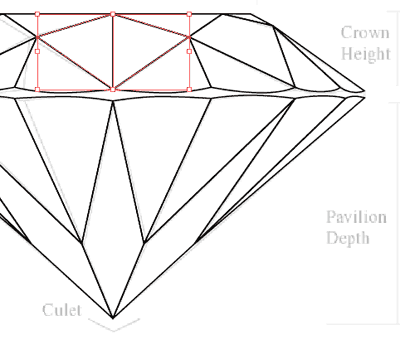
Drawing a vector diamond is pretty simple in Adobe Illustrator. First, let’s do some research on the anatomy of a diamond. We don’t want to do some fancy cut and get rejected by our clients. Here’s a proportional diamond line art taken from the website. We will use this as a guide to help us create a perfect diamond in this Illustrator tutorial. 
1. Create a template guide
First, place the line work by going File>Place and select the graphic. Go to Layers Palette and click the arrow to show the menu and select Template. This will lock and make the graphic transparent for easy tracing. 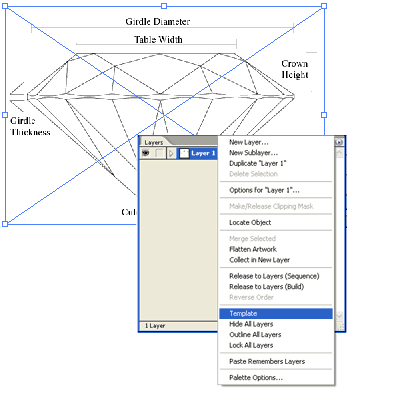
2. Placing a guide in the center
Turn on your Rulers by pressing Ctrl/Command+R. Drag a guide and place it in the center. 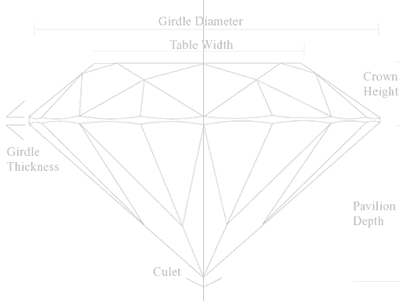 Next turn on the Snap to Grid by pressing Shift+Ctrl+”/Shift+Command+” or go Window>Snap to Grid. You will see the grid appear at the background.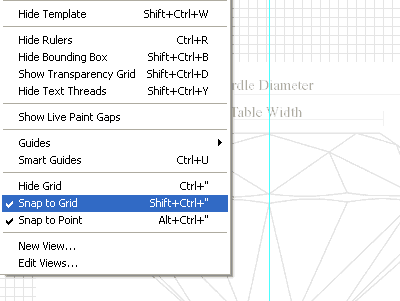
3. Tracing the artwork
Create a new layer in your Layer Palette (new layer icon at the bottom of the palette). Using the Pen Tool, start to trace each facet. The points will snap to the grid. Make sure to close each shape and make the points meet in the same spot. Do this until we complete the right half of the diamond. We can turn off Snap to Grid and manually adjust the points to fix the curves which doesn’t snap to the grid very well. 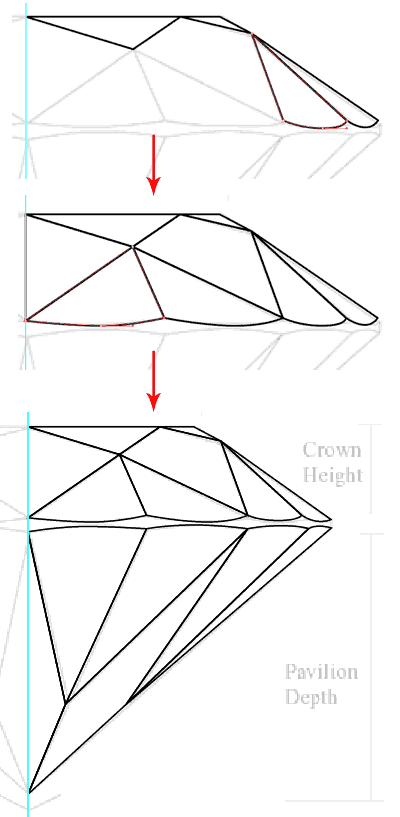
4. Reflecting the diamond
Select the whole half of the diamond. Select Reflect Tool and Alt/Option+click on the center guide line. This will pop up a menu. Select Vertical for Axis and click Copy. 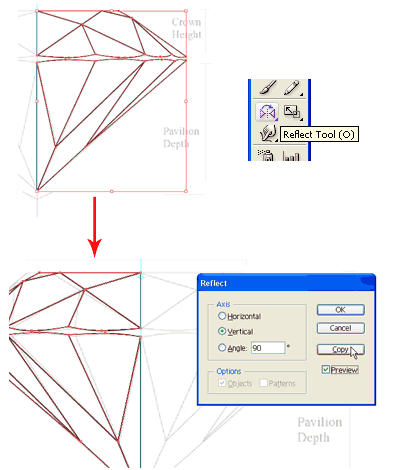 Let’s start combining the center facet. Select both the facets at the bottom and hold Alt/Option+Click and click Add to shape area from Pathfinder (Window>Pathfinder). Repeat this step for the top facets too.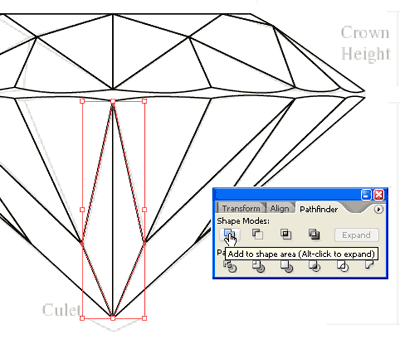
5. Fill the diamond
Select one of the facet and fill it with Linear Gradient. Create a 3rd point in the gradient by clicking in between the 2 points once and make it black. (50gram) Also turn off the stroke for the facet. 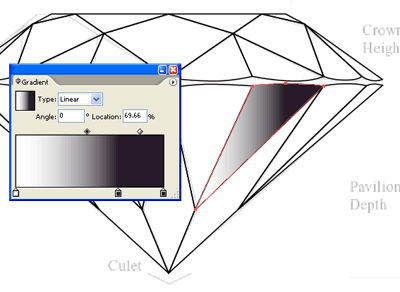 Select the rest of the facets and using the Eye Dropper Tool, click once on the facet we just filled with linear gradient. This will fill the rest with gradient.
 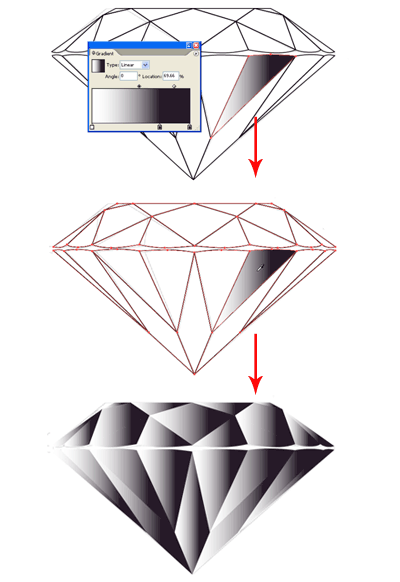 Looks pretty ugly now, so let’s fix that. Select the Gradient Tool and click and drag in different directions for each facet. Do this until you get something below.
 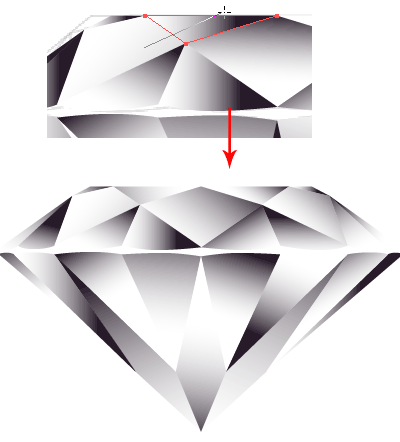 I find the black white gradient looks a bit too harsh. Let’s fix that by selecting all the facets and open both your Gradient and Color Palette. Click once at the middle black point in the Gradient Palette. The Color Palette will show the black color. Change it to a darker blue. This will make the diamond appear cooler. Better now, right?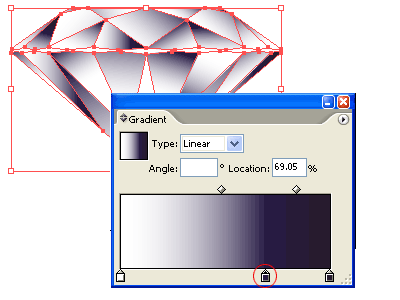
6. Drawing the girdle
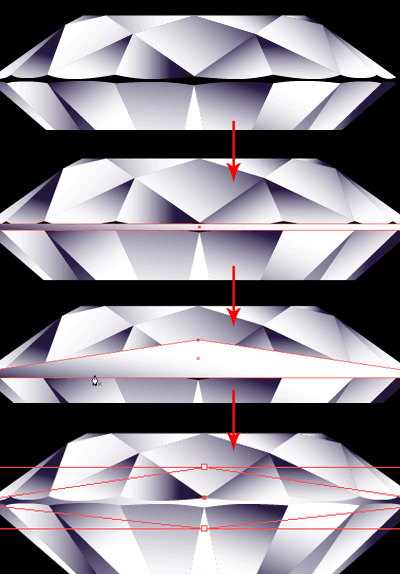
You realise I haven’t draw the girdle( new word I learnt from my research). Select the Rectangle Tool and draw a rectangle that meets all the four points of the girdle’s edges. With the Pen Tool, go near the selected rectangle and click once at the middle of the top line. This will add a new point. Click the Keyword Arrow Key and shift the point upwards. Do this for the bottom too. Once done, Right+Click and select Arrange>Send to Back. This will cover the missing girdle.
7. Finishing Touch
How can a diamond do without it’s shining glow and sparkling starburst? So let’s begin to draw a circle and fill it with Radial Gradient from white to black and send it to the back of the diamond. 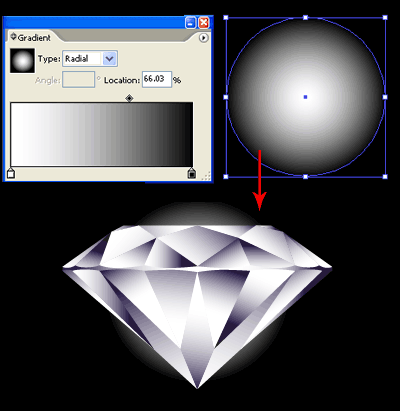 Select the Star Tool and drag a star on the canvas. Without releasing the mouse, press Arrow Up key to add additional points. Hold Ctrl/Command and drag to increase the radius. Try to get a starburst as shown below.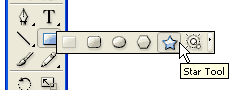
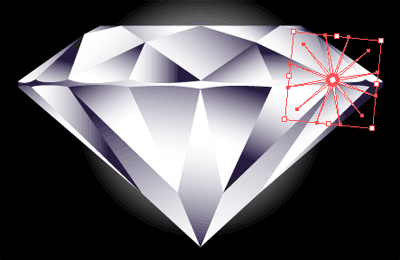 Here’s the final illustration and hope you enjoy cutting your own diamond. If you like my diamond, pls remember to “grade” my 10-carat diamond.


Click Here for Another Amazing Tutorial on Drawing a Photorealistic Diamond
Click here for diamonds promotion sale!
Great thanx 4 sharing…:).great tutorial
I just wanted to say thankyou very much for this tutorial 🙂 You did a brilliant job of explaining, and the visuals were extremely helpful.
Thanks Bekindi, I will keep up with my new tutorials. I’m now writing on a tutorial to create a cool disco ball. Be sure to catch it. =)
Great tutorials.
it was a good tutorial.
Great stuff. Keep it up
This was really helpful. Thank you for the quick lesson.
It was cool too.
very nice.. i just hope that theres a lot more tutorial will share to your site.. tnx..
actually this tutorial is give a variance design to the person.great tute
Hello. I tried your disco ball tutorial. it was very cool.
now before i get onto the perfect diamond tutorial, please tell me how you can make shinny stars!!! and how did you make the disco shine like glory!!
thank you!
Hi Sumilux,
What I did was I brought it to Photoshop to boost up the contrast and brightness.
simple but valuable for everyone
3taw18luvboknkgx
Does this “perfect diamond” have a copyright? It truly is the perfect diamond illustration and I would like to use it! May I?
Hi Lia, this illustration is for educational purposes. You may not use it in your projects. You may want to create your own Diamond.
hey great work
No download???????
Yo quiero download dude, what the hell?
superb……..gooooooood…….i like this tutorial very much
thanks allot for the diamond tutorial, it was much faster your way, but I had a little trouble with the starburst, once I gave up it worked out.
=) keep posting your tutorials, their easy to follow and very helpful. once again thank you very much!
very good, thanks
finding difficulty to creat it…
very good diamonds purchase guide
Beautifully done. Thanks for sharing.
I have 2 kiloes of diamond i want sell it .
thanks a lot for this tutorial, its very useful for so many new students .
Beautifully done! Thanks for the elegant and useful tutorial!
AweSo0o00o0o0o00o0o0ome >> cool
Wooo…. It’s nice.it was a great fun.
Very good! Great tutorials.))
thanks now i can do myself
haha i like thisss
Now this tutorial (and the end result) is impressive…did you work this out on your own or did you have some sort of templates to work with? Grade is excellent!!
Thanks for your information.
Kindly tell me as i buy H-1 quality Diamond with 0.45 weight.
What is it & about the value Please.
Thanks
Navtej
This is a very beautiful diamond, diamonds is a status symbol, I like it. Design is also quite good, so I learned a lot of knowledge, thank you
Great tutorial. I had trouble tracing whilst snapping to grid though, never seems to snap to the right place!
Also found using the shape builder tool in CS5 makes it easier to merge shapes than the pathfinder tool.
Diamond wow lovely work thanks for the tuto
Thanks a bunch… also for the “girdle”… word to be used in a different way, lol.
your a diamond cheers 🙂
May I use and insert on one of our Page the diamond picture shown on your site?
Best Regards
Roland Pochet
You make it look a lot easier than it is but i did it in the end, many thanks
Never thought it would be made so easy, just got to put my mind and time into it now!
I like it. Thank you
Thanks you!!
Very easy to follow, Thanks
Thanks for your help
This just saved me hours. Can’t believe I Googled it and found this! Many thanks
cool and awesome to see/
BLECH!!! AWESOME XP XD!!!!!!!!!!!!!!!!!!
hahahahahahhahahahahahahahahahhaahha cool
i love this website and SHINEE!!!!!!!!!!!!!!!!!!!!!!!!!!!!!!!!!!!!!!!!!!YAYYYYYYYYYYYYYYYYYYYYYYY
this is iso good.
Makes me wish i had a real diamond. awww boohoo
I WISH I HAD A REAL DOLL THAT IS AS SHINY AS THIS DIAMOND BUT I HAVE WAY 2 MUCH
AAAHHHHHHHHHHHHAHHHHHHHHHHHHHH I SAW LIKIKYA.69+
I SAW FAITH IN HER ROOM
It’s funny how easy this makes the task in hand. I spend hours and now I can do it in just minutes! Many thanks for making my life easier.
Cheers for the info this just saved me like 5 days trying to do it the hard way lol
Like real diamond. Explain very easy. I like it. Thanks for share it.
It’s such a shame I had spend ages trying to find out how to do this before I decided to Google it. You made it so so easy.
wow this illustrator is fucking awesome.
Thanks to share very easy tutorial. I like this Diamond. Thanks again.
dis is wut i call a perfect 3-D Diamond !! ;D
wow awsome…its really great..thanks
very nice.. i just hope that theres a lot more tutorial will share to your site.. tnx..